







Rich_Winsor
-
Posts
1098 -
Joined
Content Type
Profiles
Forums
Gallery
Posts posted by Rich_Winsor
-
-
Thanks guys, I need to process all that info but
I haven't seen anything yet to dissuade me from
continuing with the I-Beam approach. I figure if
worse comes to worse we can always designate
the great room as a hard hat only area and if the
ceiling does come down we'll just say that it was
San Andreas fault.

-
In the grand scheme of things it doesn’t amount to a hill of beans,
but for me this project has consumed my every waking moment for
the last 18 months. So here is the deal. To get any kind of a workable
floor plan in my farmhouse remodel project I need to replace a load
bearing wall with couple of steel I-Beams. What I’d like to know is
how I-Beams are customarily tied into a typical wall framed with 2x6
studs? In my situation I am dealing with an 8’ ceiling with a span of
about 18’ between 2 walls which are framed with 2x6 lumber. I’m
guessing that some sort of steel tubing with flanges welded on the
ends are customarily used to support the I-Beam but I see no reason
why a 4 x 6 wood beam wouldn’t do the trick. The I-Beams only weigh
12.5 lbs per foot as opposed to about 10 lbs per foot for a Douglas Fir
4 x 12. My plan is to jack the I-Beams up underneath the existing ceiling
joists and then support them with the 4x6 posts to carry the load to the
foundation. I have come up with a design which I think should do the
trick but I would be interested in feedback from anybody who might
have first-hand experience installing I-Beams. Because the ceiling is
relatively low (and I am relatively high, 6’ 6”) it is imperative that the
beams protrude down into the room as little as possible. This is why I
have decided on the steel I-Beam approach as opposed to a 4 x header
or some type of structural composite lumber beam. If I can pull it off I
should be able to encase the I-Beams in a soffit and have myself a poor
mans coffered ceiling.
Kindly peruse the attached thumbnails and let me know what you think.


-
Phew! Glad you got that sorted out CADman.
I imagine having your danglers clipped can be
a serious (and potentially painful) problem.

-
Don't get me started Curt. You can throw the bankers
in there with the politicians. They are all thick as thieves,
that bunch. My wonderful financial institution recently
tried to stick a $20 service charge on my "high yield"
savings account. I had to explain to the bank manager
in a voice that everybody in the establishment could
hear, that if I allowed them to take that money out of my
account it would mean that I would have been better off
financially if I had kept the money in my mattress because
the annual percentage yield earned on that savings
account is 0.08. That's right, were not talking a meager
8 tenths of a percent, we're talking 8 hundredths of a
percent.
BTW, I went back about a week later and withdrew all
my funds from that bank and deposited them in the bank
across the street. When they asked why I was closing
my accounts I told them it was because I don't like
having an adversarial relationship with the people I'm
entrusting my money to. Of course I'm not getting a better
deal across the street but it still makes me feel better.

-
Chief now has spiral ducting you can download in the 3D Library.

-
Sheesh! The things you learn. So it turns out
that there are four ways to exit Chief. You can
hit Alt+F4, You can hit the File drop down menu
and then hit Exit, you can hit the Chief Architect
Premier X6 icon in the upper left hand corner and
then hit Close or you can hit the X in the upper right
hand corner. No matter which method you select
you will get a reminder to save your work if you
have a plan open. So I guess the point is that
Chief recommends that you save your plan first
and then exit the program by whatever method
you choose as opposed to exiting the program
and then saving your work when prompted to do
so. I still don't see what the difference is.
And while I'm thinking about it why on earth is
Windows still using a 3 1/2" floppy disc as an
icon for saving your work? There is probably
a whole generation using computers now who
have never seen a 3 1/2" floppy disc. Here is
my suggestion for a new Save icon.

-
 1
1
-
-
No, no, no, don't get your hopes up. Not me but the program.

I'm sure this is a no brainer for the majority of you but it came
as news to me. In a moment of weakness as I was reading the
reference manual I came across the procedure for exiting the
program. I mean when faced with over a thousand pages of
reference material how many people take the time to read the
part about exiting the program? Well, I did and it turns out that
there is a preferred method to exit the program. There have
been many times that I have closed Chief with a plan still open.
No biggie right, the program simply asks you if you want to
save the current plan or not. It turns out that this is not the
preferred method. The manual doesn't say why but it does say:
"Select File> Exit to exit the program. If you have not saved any
open plans, you are reminded to do so. It is better to save your
work before exiting than to save on exit".
I can't for the life of me see how this would make any difference.
-
A little like closing the barn door after the horses are gone,
but check out this link to the Corsair website. You can test
your power supply with literally nothing more than a paper
clip. I had a rig that became increasingly unstable finally to
the point of being unbootable. While in it's death throws it
manifested numerous symptoms; memory error beep codes,
video driver error messages, a totally unresponsive mouse
and others I am probably forgetting. I troubleshot everything
from the video and mouse drivers to swapping out memory
chips to by passing the case power switch to testing the
power supply and lord know what else before I came to the
grim realization that the culprit was the motherboard itself.
This pissed me off to no end since it was a very pricy top
of the line MB and of course you have to tear your rig
completely down to replace it.
-
Drat! Someone's on to me.

-
So last Saturday night I sat down at the keyboard at
11:00 PM and worked on my site plan until 3:00AM
at which time I reset all my clocks back one hour and
went to bed. Does this mean that I only spent 3 hours
on the drawing?


-
I like that the distributed paths/regions can (somewhat) randomize the angles and positions. It would be even better if you randomize the sizes too. I'm thinking something like putting in a min and max height and let the program set them for you. This would have made what you were doing way easier. You should make a suggestion for this.
I would love to have the capability to be able to
vary the sizes of distributed objects as well as the
spacing and rotational angle, however I'm not sure
I have the total grasp of the concepts necessary
to make a feasible request.
It's always interesting to me just what computer
programs think "random" is. One could make the
argument that any combination is possible. It
just depends on the size of the sample and the
time over which it is taken. It's the old "room full
of monkeys banging away at typewriters" that
would eventually write all the great works of
literature if given enough time deal.
Actually I have had this sick idea festering in the
back of my mind that I should vary the heights of
the trees to exactly correspond to the heights of
the actual trees. This of course would require me
to individually edit all 160 trees. Aaarrrggghhh!
BTW, to update that room full of monkeys deal
maybe it would be more appropriate to speculate
that a room full of monkeys at the keyboard with
Chief could eventually design the Taj Mahal.
-
Rich:
nice "compound"
with all the fencing study your walk flows and ensure you have easy access to various areas
without having to "go the long way" just to get there
is there access for large trucks - say a tree cutter to get to most sections of the site ?
I have 2/3 acre and have a 12' wide double gate at the front for large vehicles
been here 2 years and so far had a cement mixer for an addition and a tree truck
also had my pre-built shed delivered and dropped on site
Lew
I am truly blessed Lew. With all the good and bad decisions
we end up making in life, somehow I managed to land on my
feet in making perhaps the biggest decision of all, where we
are going to live.
Funny you should mention fencing and walk flows. After about
2 weeks on the property I made my first major investment and
bought myself a Honda Recon ATV. I haven't regretted it for
one moment since
. The fences were all erected by thedear little lady who previously owned the place. She was a
legend in the neighborhood on her tractor with her post hole
digger. The fences do help control the flow of wild critters
across the property.
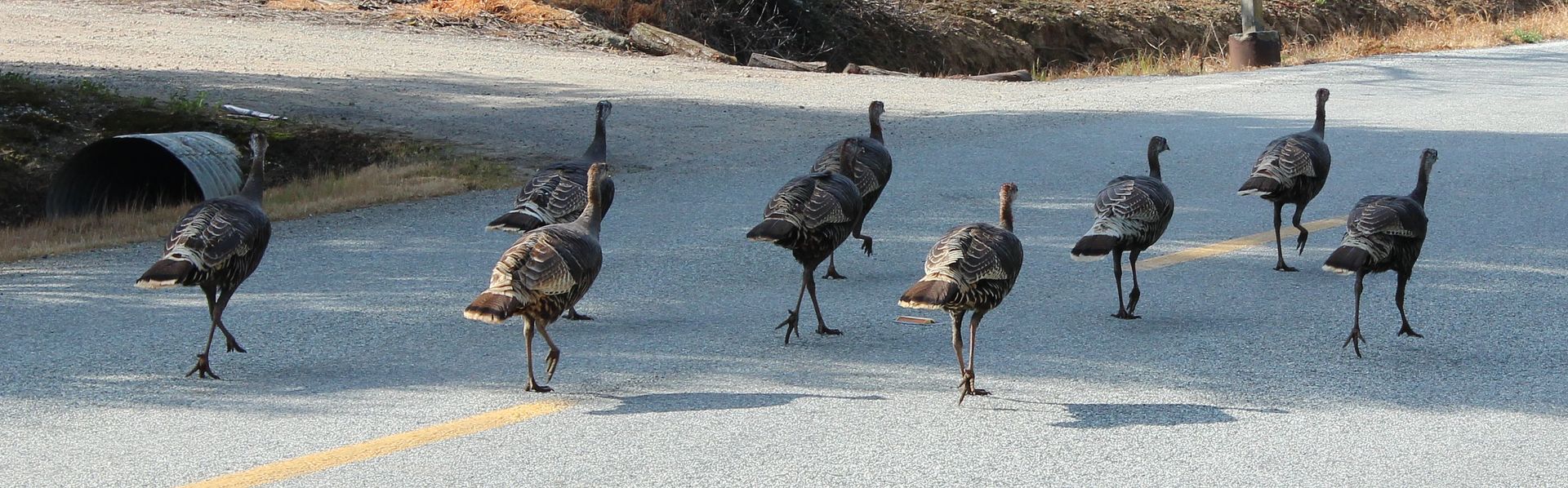
Here is a rafter of the local gals out for their morning constitutional.
-
OK, here’s the poop. First off thanks for all
the suggestions. I had a play with this over
the weekend and this is what I came up with.
As suggested, there are several ways to go
about spacing out and rotating a row of trees.
But… but… but… there is no way I can find to
automagically vary the heights of the trees.
I’m a visually oriented guy and I start to glaze
over when I’m 700+ pages into the manual and
trying to sort out Absolute and Relative angles,
so I prepared a little demonstration with a
generic tree fitted with a dorsal fin to aide in
observing the changes in object orientation.
In the end I used a combination of approaches.
I broke the trees into 8 groups of 20 trees each
which also happens to be way they are laid out for
irrigation purposes. Then I created 8 Polyline
Distribution Paths using the Random Angle Object
Orientation and increasing the mean height of the
trees in each path to create a stair step effect.
I chose the Polyline Distribution Path over the
Transform/Replicate option because it offered
the Random Angle feature. Finally, (and Glenn
neglected to mention this
), I exploded the Distributed Objects which enables the selection
of individual trees again and manually adjusted
the heights of about 75% of them to get the
desired ascending – descending effect for the
whole line of trees.
I won’t bore you with how long this process took
but suffice it to say that if I was hiring Bryce
to do it I would be out hundreds of dollars.
Anyhoo, there they are. 160 trees with no 2 alike.
BTW, this is for a site plan I am working on for
my spread here. The area encompassed by the
fence is exactly 2 acres and contains all of the
structures on the property. I still have several
structures and dozens of trees to add to the
plan (file size is currently 18MB and climbing).


-
Wasn't that back when dinosaurs roamed the earth?
Where did you play? My meteoric career was cut tragically
short when I blew out my ACL in my sophomore year at
San Jose State.
-
I don't know Cadman, when I placed both of those
symbols in a plan neither one looked to be 3D. I've
wasted all the time I'm going to trying to figure out
how get the Plant Chooser and the Library Browser
synced up. I have created a plan specifically for 3D
plants and I just drag the symbol in question into that
plan and see how it looks. Since I can rarely find the
specific type of plant (especially trees) I want I usually
end up picking out a symbol that resembles what I am
looking for and going with that.
-
Here's my approach. Let me preface these remarks by
saying that I run all my "A" programs on a dedicated
stand alone workstation. If you are on a network I
wouldn't necessarily advocate this approach.
First off I almost never install a new program while
connected to the internet (the rare exception being
some software updates downloaded from the internet).
Obviously I always try to obtain a hard copy (CD DVD
etc.) of the software I buy and install. Once a program
is installed I will then connect to the internet to activate
and update it as necessary. This approach precludes
having the installation programs running amok and
installing all kinds of unnecessary things.
The first thing I do after installing Windows is to
systematically disable Windows Update, Messenger
and Windows Firewall. I also run without any anti-
virus software whatsoever. IMHO, antivirus software
is by its nature a virus (a benign virus hopefully but a
virus none the less) that always runs in the background
using up valuable resources and interfering with normal
computer operations. I don't use my workstation to surf
the internet. I have older "retired" rigs that I use for that.
I tend to upgrade at semi-regular intervals and when I
do I usually upgrade everything at the same time. For
example my previous rig was a Pentium4 running
Windows XP Pro, Internet Explorer 8, Office 2003,
Adobe Acrobat 9 etc. It was so stable and reliable that
I used it until much of the software had become "sunset"
and the advent of newer versions finally forced me to
upgrade. Now I'm up to Windows 7 Ultimate, Internet
Explorer 11, Office 2010 and Adobe Acrobat 10. When
I get a good combination of compatible programs I
rarely worry about updating them unless something
comes along that is really worthwhile. I don't mind
being a version or two behind what is considered to
be cutting edge as I find these programs are usually
more stable and have had any major problems resolved.
What does all of this mean? You tell me.
I find myrigs to be fast, reliable and crash free. And in the event
that something should go terribly awry I am not above
taking a night off and doing a fresh install of Windows
and all my programs. In fact I advocate this practice
from time to time to give your rig a new lease on life.
-
You could go to DJP's house.
-
Lisa, what Scott was so eloquently trying to say is
that if you enable "show shadows" in the Render/
Preview Options section of the Preferences menu
the shadows will always stay on (even when panning
and rotating). A very nice touch.
BTW, I think the speed with which the shadows are
now rendered is more a function of an improvement
in version X6 than your fast Mac. They are fast for
everyone now.

-
I would be interested in knowing what kind of
speed increase you realize if you get around
to overclocking your CPU. I have never put
the overclocking capabilities of my rig to use
as for the most part the plans I work with
haven't been that complex and I haven't seen
the need.
Nice crisp RT's BTW, and your second image
reminds me that roundball season starts tonite.
-
1
-
-
..... I do not want to be the cheapest guy on the block. So funny, I used to be proud of the fact that I was the cheapest guy on the block..... and it worked okay for me......
I mean how much does it cost to furnish the underside of a freeway overpass.
LOL! I don't remember which of the first astronauts it was.
Alan Shepard, I believe, who when asked what he was
thinking while sitting on top of a rocket about to be launched
into space replied that he was thinking that the rocket had
been built by the lowest bidder.
BTW, I think I'm beginning to see why your internet connection
is so slow. Time-Warner isn't going to upgrade service to that
overpass any time soon.
-
OK, does anybody have an easy peasy way to arrange
160 3D Italian Cypress trees evenly spaced along a 500
foot road so that they vary from 8 feet tall at one end to
30 feet tall at the other end and no two trees look alike?
Yeah, I didn't think so.

-
Don't know why I didn't try this sooner but if
you don't enter anything in the "Name" field of
the Plant Chooser and instead just select a box
in the "Type" field (along with any appropriate
Sub-Type) and hit the Search Button you will get
a list of everything of that type in the Browser.
Unfortunately as Jon and Nic have noted you
can't tell which ones are 2D and which ones
are 3D.
I too would be interested in a site for good
quality 3D tree symbols since the Library
and Bonus Catalog 3D offerings are limited
at best.
-
It looks to me like you are trying to access the 3d feature
while you are still in plan view. If you open or create your
3d view those options will be available to you. Most of the
3D dropdown menu items are unavailable in plan view.
-
Does anybody know of a way to get the Library
Browser to display the plants by their Common
Names and not the Scientific Names? I really
don't want to become a Botany major just so
I can locate a Walnut or Apricot tree. And of
course as we all know by now the search
feature is as useless as teats on a boar hog.
I do realize that you can cross reference the
names in the Plant Chooser but you have to
enter each category of plant individually and
there are dozens of categories.
-
1
-


3D Text
in General Q & A
Posted
Beckham? ...... Beckham? Oh yeah, you mean Mr. Posh Spice.
There is another Beckham playing football now and last night he
gave new meaning to "Bend it like Beckham" with a catch that is
being called the greatest of all time by many.
http://espn.go.com/blog/new-york-giants/post/_/id/40499/giants-odell-beckham-jr-makes-incredible-one-handed-touchdown-catch
PS. It's worth suffering thru the obligatory ad to see the shots.