







SNestor
-
Posts
2183 -
Joined
-
Last visited
Content Type
Profiles
Forums
Gallery
Posts posted by SNestor
-
-
Steve,
For the walls where the bottom follows the stairs you can attempt to break the wall and shape it...but, this can be a PIA. I usually just fill that triangle space using a solid.
Sometimes a ceiling plane carefully placed can work...but again, this is time consuming and a PIA. I usually just place a solid for the underside of the stair drawn using the backclipped cross section camera.
Don't get me started on the stair tool...

-
 1
1
-
-
I agree with the others that posted...
However, you could just make the porch room "no ceiling"...and use a ceiling plane to create the porch room ceiling. Place the ceiling plane at the elevation you want it to be...and set it to have a zero pitch.
-
You should not have to be doing that...typically a wall will use its default material. You are probably copying a wall type where the wall material is not using the wall type definition material.
Create a new wall type...define it with the materials you want and save it. The out of the box Chief template file contains numerous wall types that are defined correctly that you can copy and recreate...without changing the material properties.
-
On 2/12/2026 at 12:48 PM, CA_Russell said:
All,
I can build a standard residential plan set to default height: 109 1/8".
Then I can adjust the room heights via ROOM OBJECTS.
What I cannot seem to understand is if I have a common room height, say 10'...
.. then I need to adjust outside plate heights for added interest / design elements to 14 ft.
How is this effectively achieved without breaking the AUTO tools?
Ryan Russell
"Rooms" dictate the height of walls. Try not to drag a wall up/down...walls you drag will never change until you "reset" them to "default".
Set your default room height in "defaults". Only make changes to individual rooms using the room dialogue as needed. Once you use the room dialogue to make a change...changes made to your defaults will no longer effect those rooms.
-
1
-
-
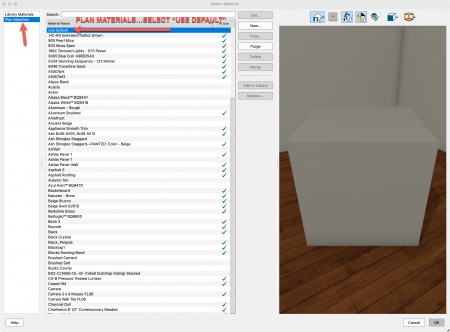
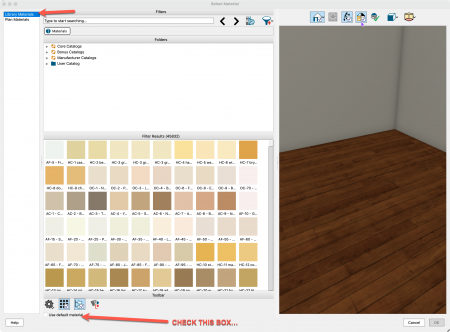
Define your wall with the materials you want, then...in the materials tab make sure all the materials listed show these as "default".
If not, then open the material and change it to "Use Default" from the list of plan materials...or, check the box at the bottom of the LIBRARY MATERIALS dialogue..."Use Default Material"
See attached;
-
On 1/31/2026 at 4:23 PM, GeneDavis said:
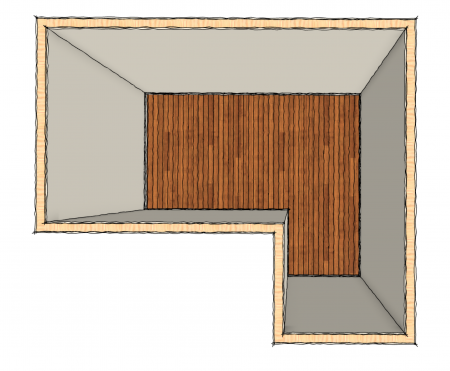
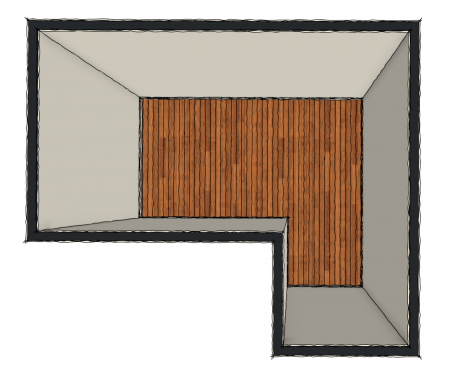
If hand-drawn means squiggly lines, Chief does not have that option in 2D plans.
You could send this to layout..."Floor Overview" using 3D top down view. Rendering technique Standard with hand drawn lines.
If you change the framing layer to something solid...like Black.
-
1
-
-
Is the post a “suggestion” or just frustration.
-
Make the segment of wall that sits on top of the roof “roof cuts wall at bottom”.
-
1
-
-
Roofs cut walls. So…this isn’t possible. I’ve done this in the past by drawing the deck somewhere else in the plan…or a new plan and then converting this deck to a symbol.
-
Software development seems to have matured to a point where all we get is “change for change sake”.
Will PM provide us with noticeable gains in productivity?
With all the requests Chief has for adds or improvements…why now such a priority on this new paradigm.
-
4
-
 4
4
-
-
I can assist with training and/or plan development.
-
This video may help you…
-
1
-
-
On 4/15/2025 at 2:37 PM, morganremodel said:
Adding a front porch with a roof with a higher pitch 8/12 than the main roof which has a 4/12 pitch. Having issues getting the new roof to connect with the main main and look ok. Also having issues doing a sloped vault with joists to that sloped vault that go to the top plate of the opposite wall. If you know Chief Architect well and have some paid availability to help, it would be much appreciated
File is for the sloped joists
Thanks
I offer 1:1 Chief Training...see my website below in my signature.
You should post the plan file...
-
1
-
-
I can help...all I do is Chief Training.
-
Like this?

-
Are you planning on building a deck over the rooms below in the basement?
Tell us what you are attempting to construct...
-
Its under the "rails" section of the Railing Defaults dialogue.

-
1
-
-
I gave it a shot...a number of issues. Your floors were not at the correct height. Your stairs don't work...see the plan I've attached. I did fix the roof...maybe not exactly as you want. I used a ceiling plane inside the space to eliminate the structural differences between the 12/12 roof and the dormer roof. May not be what you want.
Shaw garage - Steve Fixed 2.plan.zip
One thing you should do is try to draw your plans as close to 0,0 as possible. Also...to fix your plan I'd set your floor height in defaults and then go to "Edit>Reset to Defaults"....reset floor and ceiling heights, roof directives in walls, wall tops and bottoms. (see attached)
-
Here is the plan...forgot to attach on my previous post;
-
Take a look at the attached plan....
I added a second floor. Used the complete break tool on the stair. Made the wall under the stair a "partition wall" so that the upper wall end is covered with drywall.


-
1
-
-
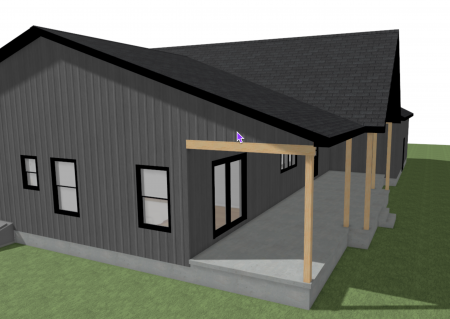
I defined the porch wall as shown below...the gable roof went away (with auto roofs turned on). You do get the concrete slab overhanging 1.5" also.
You should use a railing wall to define the entire porch...I see you used an invisible wall and then placed a beam. The beam is fine for a section...but, I'd use the railing wall - post to beam - to define the space.

-
I downloaded your plan...I'm not seeing the problem. Your porch overhangs...and the roof looks correct.

-
You should post the plan file. Close Chief first...then upload the file. Thanks
Also...what is a queen post open truss? Are you referring to a decorative gable end detail? If so...I have a video on that process on my YouTube page. It's an older video but the process hasn't changed;
-
1
-
-
I created a number of dormer videos that might help you.


Per project help
in Seeking Services
Posted
I've helped many just like you over the years...
steve@mychiefskills.com