ComputerMaster86
-
Posts
868 -
Joined
-
Last visited
Content Type
Profiles
Forums
Gallery
Posts posted by ComputerMaster86
-
-
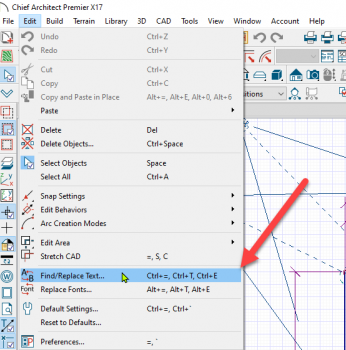
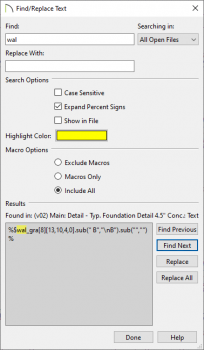
Just a small FYI about Chief's "Find and Replace" tool. If the word "Batt" is the output (computed result) of a text macro, "Find and Replace" will be of no help in locating and finding the word. It works as advertised on actual text, or pieces of text that are part of macro code.
-
 1
1
-
-
1 hour ago, para-CAD said:
I only see this when using point to point dimension. I’ve been told that that dimensioning tool has to have something for the end of the dimension to snap too and it generates the marker. It sucks that the marker can’t have zero size and it also sucks that sometimes when you delete the dimension the marker stays. I don’t know if this is an easy fix for them but at least in preferences you should be able to set the dimension marker as a super small size as opposed to if you’re trying to place a regular marker
I never use that dimension tool and I still get random plus markers in CAD details. Sounds like others are having the issue.
-
 1
1
-
-
I might be experiencing this in X17 if it's the same issue. I have cross-shaped (+) marker's that keep reappearing even if I delete them. They appear randomly in random spots in 2D CAD Details.
-
1
-
2
-
-
-
For those of you that use horizontal framing, what is the secret sauce to getting the "Bottom Run Elevation" to work correctly? Maybe chief needs to do more work on this feature.
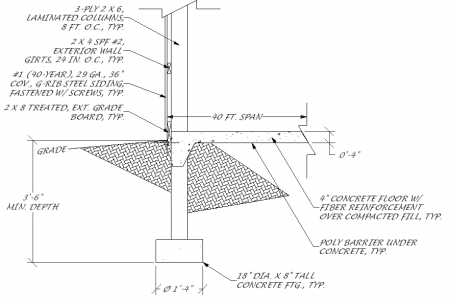
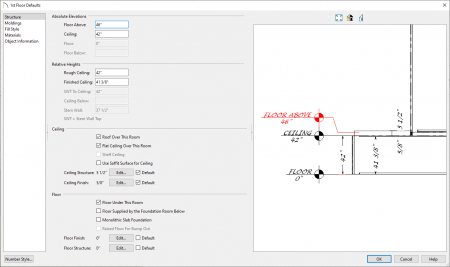
I have my template set up so that I always draw my first floor on Chief Architect's 2nd level. I am trying to get the bottom edge my 2 x 8 (Bottom Girt "Grade Board") to align with the bottom surface of the 4" concrete floor.
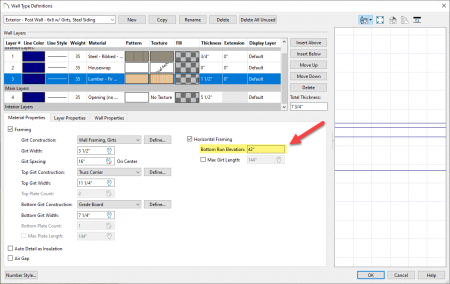
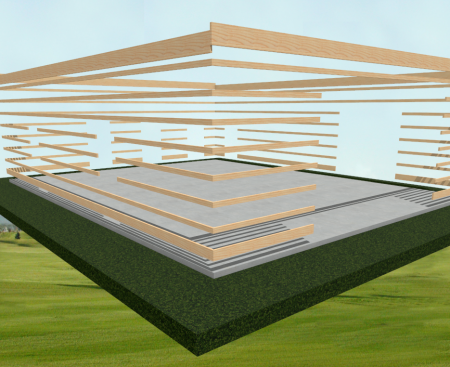
I am not concerned with modeling the thickened edge of the concrete for the purpose of the 3D display but, typically I just let the concrete be 4" or whatever thickness is being used. The bottom edge of the grade board is usally placed at the same elevation as the bottom edge of concrete .
Chief's level 1 I do not typically use other than I set it to a 42" rough ceiling. 42" is the distance that footings typically need to be below grade in Michigan unless the AHJ requests deeper.
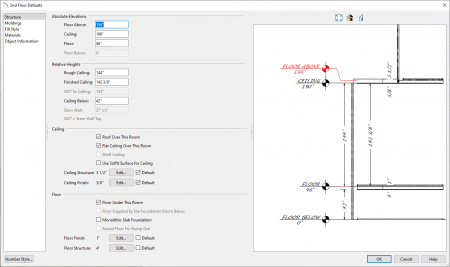
-
I have my Chief Architect plan template set up to use separate plans views for different floor levels. I have been doing this for a long while now, probably almost as long as I have been using plan views. The only thing I have not done with this setup was use separate layer and annotation sets for different floor levels. All floor levels reference the same layer set and annotation set for each plan view type (floor, electrical, plumbing, furniture, framing, etc.). Each plan view type has its own layer and annotation set. For me, separate plan views for different floor levels seems to offer flexibility and less issues when using reference display. For example, my 2D post / footing symbols for post-framed buildings are usually placed on the main floor level. Then for a 2nd story they are referenced using reference display with a dedicated layer set on the upper level. I do need to think this all through again and see if plan views for different floor levels are truly necessary in my reference display work flow.
-
1
-
-
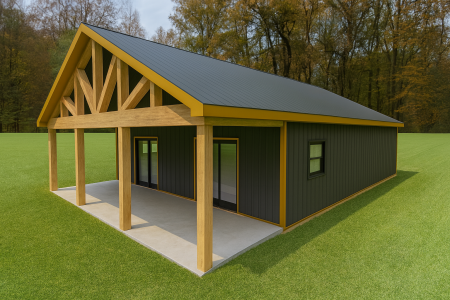
I must of also tried the following prompt at some point...
"Create a HDRI photo realistic rendering. Keep integrity of original image. Do not change any image details. Do not move or modify features. Keep all colors the same. Add natural sunlight. Keep original image Size."
-
Here is an image I exported from Chief and tried in chat GPT a few months back...

Here was the output from chat GPT...

It added a shingle ridge cap to a steel roof.
 It misinterpreted the porch beam and that was a little off.
I used "Create photo realistic rendered image. Keep integrity of original image." I probably needed to use a better prompt.
-
On 2/23/2026 at 10:01 AM, Michael_Gia said:
@Chrisb222Nice, I also get decent results with ChatGPT but would like some kind of built-in AI. Not like SoftPlan. I'm sure Chief can come up with an intelligent solution.
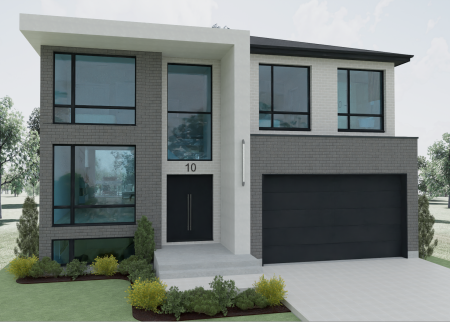
Here is my Chat GPT workflow.
I upload a PBR render.
My prompt is: "improve the lighting and landscaping and material quality but do not change the materials or architecture."
Chief PBR
ChatGPT:
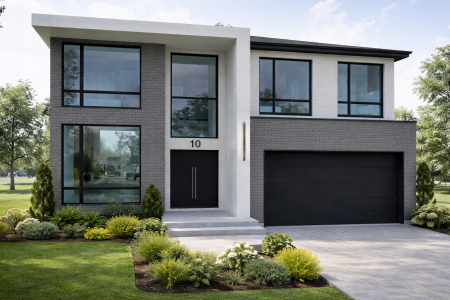
I played around with Chat GPT and used various prompts and wordings. it always seemed to change things I didn't want changed or made small mistakes I didn't notice at first . When I noticed the quirks you couldn't unsee them. Maybe Chat GPT gets better with each iteration. I just hope Chief doesn't waste boat loads of resources on A.I. and other non A.I. new features have to suffer or be put on the back burner.
-
2
-
-
On 2/17/2026 at 9:52 AM, Renerabbitt said:
I use the radial menus of the spacemouse in conjunction with modifier keys on my g604 giving a potential 500+ hotkeys with on screen graphics.
I have always wondered about this part. You must have figured out how to modify a configuration file to have radial menus populate using buttons on a non 3dconnexion device.
-
I have been desiring to fillet arcs in chief for a few years now. The work arounds are a bit of a pain to achieve what I am always after. And then don't even get me started on the fact we can't trim / extend / break ovals and ellipses. I could even go on...
More Circle Creation Tools
* 3-Point Circle
* Circle Tangent to Line
* Circle Tangent to Arc / Circle
* Circle Tangent to 3 Arcs / Circles
Now I am just being silly.

-
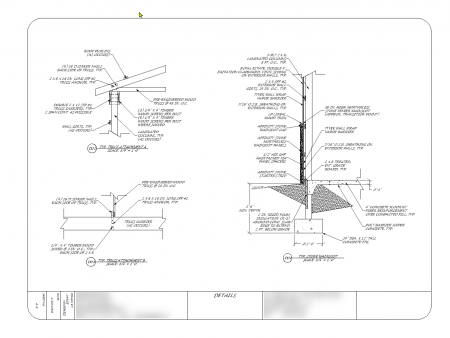
Even though Chief is a 3D program it still has a lot of great 2D drawing tools that make drawing details almost a breeze. They even revised / improved angle snaps (angle guides) in X17 for even more flexibility.
-
Have you tried exploding the original dormer, selecting the individual components of the original dormer and the n use copy reflect about?
-
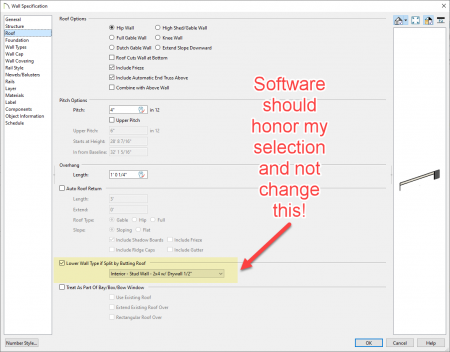
I have fought with this for several versions now and it is beyond frustrating and annoying. I have wondered if this is a bug that has never been addressed or resolved. When using "Lower Wall Type if Split by Butting Roof" Chief doesn't like to honor your chosen wall type. I find it will typically change the wall chosen to the default interior wall type. The work around is to make sure your default interior wall type is the same as what you want for "Lower Wall Type if Split by Butting Roof". If you need to use more than one wall type in different "Lower Wall Type if Split by Butting Roof" scenarios then your screwed.
-
I just renewed my SSA and paid the same price I did about a year ago. My SSA renewal / expiration date is always in the middle of January. For me December is a great time to put some that Christmas $$$ towards renewing my SSA.
-
On 11/6/2022 at 9:23 PM, Joe_Carrick said:
Here's the latest view of my Stream Deck Setup. I've extensively modified the icons for the buttons to be as close to Chief's Toolbars as I could make them.

is there a limit to how many nestled folders the steam deck can have? (A folder inside a folder inside a folder)
-
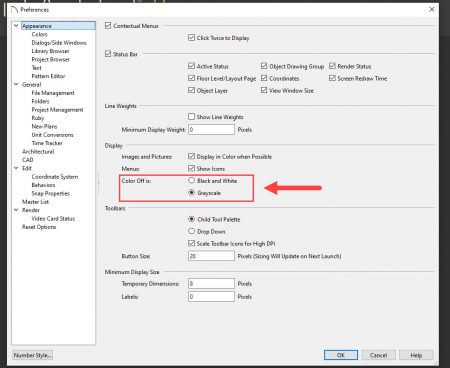
I often send my plans views to layout with color turned off. There is a setting in preferences that controls whether turning color off does pure black and white or gray scale. I didn't know if this was anything related to the original issue but, I thought I would mention it.
-
13 hours ago, Adam_Gibson said:
Evidently, I deleted if from my system a while back since I don't use it, but when opening old plans, it would be helpful to have it. Anyone know where it can be downloaded?
Can't the Chief installation file be run choosing the repair option to get the font back. That's what I would try, if I mistakenly deleted the font that comes with Chief Architect
.
-
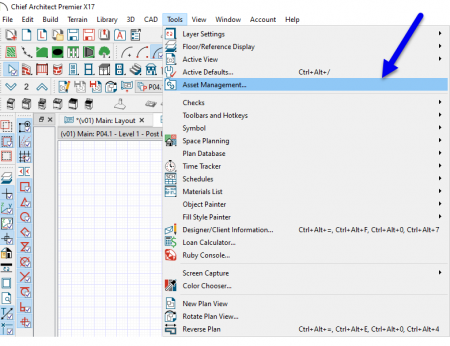
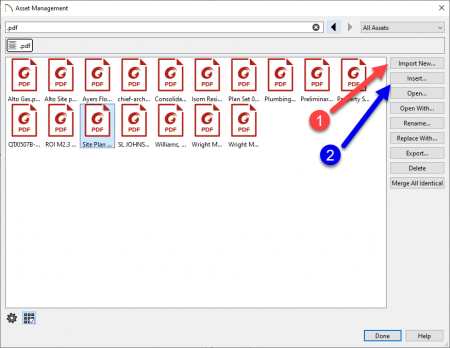
Currently if you are using "Managed Mode" Chief Architect will not let you import PDF files, images, DWG's, etc. into your plan or layout file that are stored within a project. I have complained about this on the forum and requested that chief allow us to import things that are stored in our projects. If you import the item into the "Asset Manager" first, you can insert from the "Asset Manager" into a plan or layout file.
-
I will use my custom SFF computer as an example to give you an idea of what you may want to look for with specs. Right now I am running a computer that has an...
AMD Ryzen 7-7700X 8-Core 16-Thread Socket AM5 CPU Rated at 4.5 Ghz
This has been a great CPU overall but, you will may want to go with something with more cores.
64 GB's of DDR 5 6,000 Mt/s Memory via (2) 32 GB Modules (I am using the AMD Expo Profile)
Some people will do just fine with 32 GB's of ram. This is probably overkill for me.
1 TB Samsung Pro NVME M.2 SSD
I recommend bumping up to a 2TB drive or higher.
nVidia RTX 3070 Super with 12 GB's on Board Memory
This is OK and has served me well but, if you are doing lots of renderings you may want a more powerful graphics card. Many recommend a 4080 / 5080 or higher or something like the AMD Radeon 7900 XTX.
-
1
-
-
14 hours ago, JKEdmo said:
Now that I think about it, I suspect what the OP was getting at is that the Chief tool can be fussy. You drag wall layers to where you want them and then others can suddenly spring back into their original position. That's my experience -- but I'll admit maybe I'm not using the tool correctly. The Autocad tool I mentioned is "sticky." The manual cleanups you make are permanent and truly override the automatic wall layer merging. Allows for better fine tuning.
I have witnessed that several times in the past and would have to say the tool is far from perfect. It seems manual adjustments don't never want to stay. I struggle with complex roof/wall intersection points and wish for X18 chief could bring some improvements to that area.
-
1
-
-
Doesn't the "Edit Wall Layer Intersections" edit toolbar tool do what you are asking? I am not sure if it does anything for Grade beams at the wall. It's not perfect but, I have used this tool several times to manually clean-up wall intersections.


-
8 hours ago, Doug_N said:
Glen, those are the lot lines. From the intersection of the wall to the lot line is a valid dimension and should be accepted. I have done this lots of times with X-16
I almost always have "Walls" set to "Wall Dimension Layer" option and I notice I don't get that behavior when using the "Point to Point" dimension tool. Setting "Walls" to "Surface" I was able to replicate the same behavior but the behavior was replicated in both X16 and X17.

-
I just noticed another quirk with the same image. Man, I didn't even catch this yesterday.

Below is the original export from Chief.


 It misinterpreted the porch beam and that was a little off.


Dimension Markers
in General Q & A
Posted · Edited by ComputerMaster86
I had a similar experience, I don't remember having the issue in prior versions of Chief Architect Premier. I don't remember for X16 if I was experiencing the issue. But the issue seems prevalent in X17 in CAD Details. Two things for me... I never use the Point to Point Dimension tool (I sort of hate that tool.) and I am always snapping dimensions to objects displayed on screen.
I just reported this to chief and included two different plan files with specific CAD Detail examples. I will see what they say.
.